
UPDATED: JULY 16, 2026
Over the past couple of weeks, you may have received an email from our new CRM platform, Glue Up. The Chamber team is transitioning to this new CRM system during the summer to better serve our members.
These automated system emails have been sent on behalf of the Chamber.
We are working to consolidate and clean up all data from the prior system. We appreciate your patience as we ensure your member profile information is all up to date.
We encourage you to set up your account in our new member portal to:
- Update your profile on our directory
- Access event tickets
- If you have updates to your organization reps, please reach out to info@halifaxchamber.com to get the information updated
Next steps:
- Find the email from Glue Up by searching “Welcome to the Halifax Chamber” OR “Glue Up” in your email search bar
- Click the Manage Member Account Now button
- Click “Register Now” underneath the login form (Screenshot below)
- Enter the name and email associated with the account (any of your active reps will work)
- Upload your logo to your member profile
- Explore your new member portal
If you feel unsure about clicking any links, please feel free to check in with us at 902-468-7111 or info@halifaxchamber.com and we can verify. We appreciate your patience as we make this exciting change.
Please note: If you are wondering about the emails regarding “Rewards Points”, this was previously known as Chamber Bucks, and our new system is helping to make these events and digital advertising credits more accessible to you. These are not yet available as we are currently validating all Rewards Point balances transferred from our previous system.
Thank you for your understanding as we work to serve you better.
We will keep you informed about the new system in the coming weeks.
We’re in your corner.
Your Chamber Team
Frequently Asked Questions (FAQ)
Is this Glue Up email legit?
Yes, yes it is!
I can’t reset my password.
You can only reset your password once you’ve already logged into your new member portal.
Instead of choosing “Reset Password”, please click “Register Now” or “Create New Account” underneath the “Login here” information.
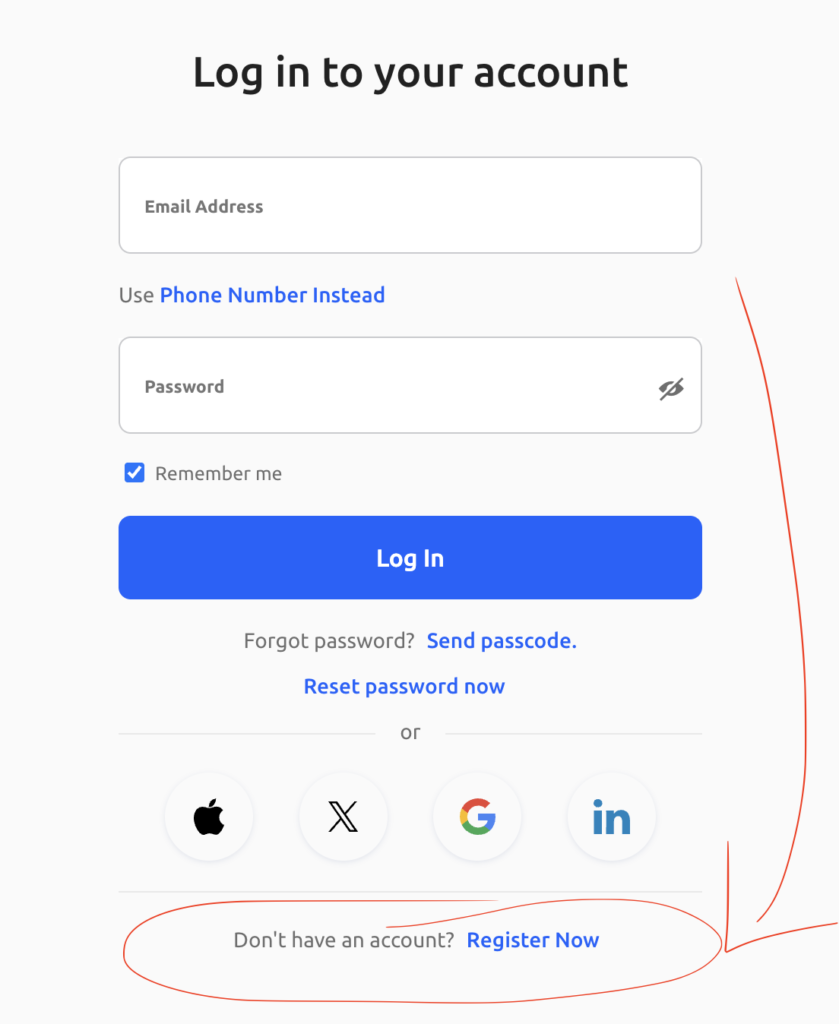
1. You should have received an email “Welcome to the Halifax Chamber” –
Please click “Manage your Member Account” to access your member portal
To reset your password, on the left navigation, click Settings -> Sign in & Security -> Change Password
If you can’t locate that email, please let us know and we can resend.
*If you’re still unable to access your account, your membership may be under renewal – if this is the case, we are working on a fix with the Glue Up system, thanks for their patience.
How is there incorrect info in my member account?
We are cleaning up the data but if you see any errors, please feel free to let us know and we can fix it for you.
Why did former employees receive emails from the system, though I know we corrected that information already with the Chamber?
Our former system held on to inactive reps, and some may have been transferred during our transition. We are working to clean this up, so you don’t have to flag it with us.
When will all my member data be finalized in the system?
If it is not already, we are aiming to have everything finalized by end of summer.
Why is my logo no longer on my profile?
The new system does not accept image transfers, so we are asking everyone’s support in setting up their member account with their logo in our new system. This ensures we have the most recent logo as well.